You leave CI/CD pipelines vulnerable by over-privileged service accounts, hardcoded secrets, and unverified dependencies. These mistakes let attackers alter build logic or steal credentials. Fix them by enforcing least privilege, using secret management tools, and verifying every input source.
Mistake 1: Using Over-Privileged Service Accounts
Service accounts often hold administrative rights to simplify deployment tasks. This convenience creates a high-value target for attackers who compromise the pipeline. If a service account has write access to production databases, a single compromised build grants full data access. The pipeline becomes a bridge between a low-trust build environment and high-trust production systems. You effectively remove the security boundary between development and operations.
Why it hurts:
An attacker who injects code into a pipeline job inherits the permissions of the service account running that job. This allows lateral movement into production environments without needing additional credentials. The breach remains hidden because the activity appears to come from a legitimate system account. You lose the ability to distinguish between normal deployment activity and malicious data exfiltration.
The fix:
Apply the principle of least privilege to every service account. Grant only the specific permissions required for each pipeline stage. Use short-lived credentials that expire after each job completes. Review these permissions regularly to remove unused access rights. This limits the blast radius of any pipeline compromise.
Mistake 2: Hardcoding Secrets in Configuration Files
Developers often store API keys, database passwords, and encryption keys directly in configuration files. This practice simplifies local testing but exposes sensitive data to anyone with repository access. Version control systems retain full history, meaning deleted secrets remain accessible in previous commits. Attackers can scrape public and private repositories for these exposed credentials.
Why it hurts:
Exposed secrets allow attackers to authenticate as your application or infrastructure. They can access customer data, modify cloud resources, or pivot to other systems. Even if you rotate the credentials, the breach may have already occurred. The presence of secrets in code also violates compliance requirements for data protection.
The fix:
Use a dedicated secret management solution to store and retrieve credentials at runtime. Never commit secrets to version control, even in temporary branches. Implement pre-commit hooks that scan for common secret patterns and block commits containing them. Rotate credentials regularly and monitor for unauthorized usage.
Mistake 3: Trusting Unverified Third-Party Dependencies
Build pipelines frequently download libraries and tools from public repositories. These dependencies are often trusted implicitly without verification of their integrity. Attackers can compromise popular packages or create malicious lookalike packages. When your pipeline downloads these compromised dependencies, the build process executes attacker-controlled code.
Why it hurts:
Compromised dependencies inject malicious code directly into your build artifacts. This code runs with the same privileges as your application. You may deploy malware to production without noticing any change in your own source code. The attack is difficult to detect because the malicious code comes from a trusted source.
The fix:
Verify the cryptographic signatures of all third-party dependencies before using them. Pin dependencies to specific versions to avoid unexpected updates. Use a private proxy or registry to cache and scan dependencies. Implement software composition analysis to identify known vulnerabilities in your supply chain.
Mistake 4: Skipping Branch Protection Rules
Many teams disable branch protection rules to speed up development workflows. This allows direct pushes to main branches and bypasses mandatory code reviews. Attackers can push malicious code directly to the production branch if they gain write access. Without review gates, malicious changes enter the build pipeline immediately.
Why it hurts:
Direct pushes bypass security checks and human verification. Malicious code can alter build scripts or inject backdoors without detection. The lack of audit trails makes it difficult to identify who made the change. You lose the opportunity to catch logical errors or security flaws before deployment.
The fix:
Enforce mandatory code reviews for all changes to main branches. Require status checks to pass before merging pull requests. Restrict write access to main branches to a small group of trusted users. Enable signed commits to verify the identity of code authors.
Mistake 5: Running Builds with Root Privileges
Build agents often run with root or administrator privileges to install tools and modify system files. This configuration simplifies setup but grants excessive power to the build process. If an attacker compromises the build script, they gain full control of the build agent. They can install backdoors, steal data, or pivot to other systems.
Why it hurts:
Root privileges allow attackers to bypass file system protections and kernel security features. They can modify system binaries to maintain persistent access. The compromised agent can act as a pivot point for further attacks within your network. You lose the ability to contain the breach within the build environment.
The fix:
Run build agents with minimal privileges required for the task. Use containerised environments to isolate build processes from the host system. Implement read-only file systems for build agents where possible. Regularly patch and update build agent software to mitigate known vulnerabilities.
See also: Cloud Compliance Mistakes: Why Controls Fail and How to Fix Them
Mistake 6: Ignoring Pipeline Configuration Drift
Pipeline configurations often diverge from security policies over time. Developers may add temporary permissions or disable checks for urgent fixes. These changes are rarely documented or reviewed, leading to configuration drift. The pipeline becomes increasingly permissive, creating unknown security gaps.
Why it hurts:
Configuration drift introduces inconsistencies between intended and actual security posture. Attackers exploit these gaps to bypass controls that were previously effective. Auditing becomes difficult because the current state does not match the documented policy. You may fail compliance checks due to undocumented deviations.
The fix:
Treat pipeline configurations as code and version control them. Implement automated compliance checks that validate configurations against security policies. Alert on any changes to pipeline settings that deviate from the baseline. Regularly review and clean up unused or temporary configurations.
Mistake 7: Failing to Monitor Build Artifacts
Teams often focus on source code security but neglect the integrity of build artifacts. Artifacts are the final output of the pipeline and are deployed to production. If an attacker modifies the artifact after the build, the deployed software is compromised. Without verification, you cannot trust the deployed software.
Why it hurts:
Modified artifacts bypass source code security checks. Attackers can inject malware into the final binary without altering the source code. This makes detection extremely difficult as the source code appears clean. You deploy untrusted software to production, exposing users and data.
The fix:
Digitally sign all build artifacts and verify signatures before deployment. Use immutable storage to prevent modification of deployed artifacts. Implement hash verification to ensure artifact integrity throughout the deployment process. Log all artifact access and modifications for audit purposes.
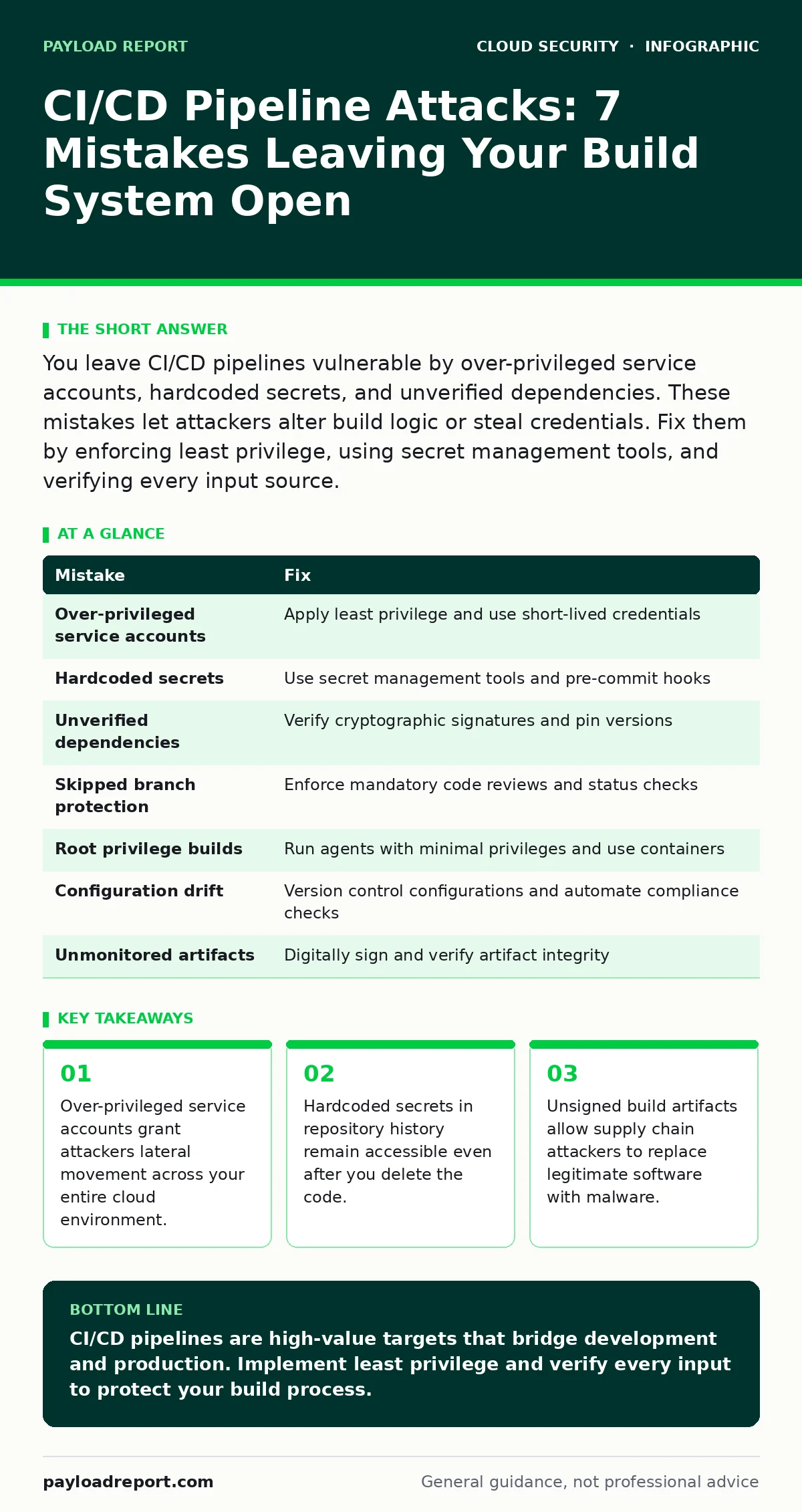
| Mistake | Fix |
|---|---|
| Over-privileged service accounts | Apply least privilege and use short-lived credentials |
| Hardcoded secrets | Use secret management tools and pre-commit hooks |
| Unverified dependencies | Verify cryptographic signatures and pin versions |
| Skipped branch protection | Enforce mandatory code reviews and status checks |
| Root privilege builds | Run agents with minimal privileges and use containers |
| Configuration drift | Version control configurations and automate compliance checks |
| Unmonitored artifacts | Digitally sign and verify artifact integrity |
Key takeaways
- Over-privileged service accounts grant attackers lateral movement across your entire cloud environment.
- Hardcoded secrets in repository history remain accessible even after you delete the code.
- Unsigned build artifacts allow supply chain attackers to replace legitimate software with malware.
CI/CD pipelines are high-value targets that bridge development and production. Implement least privilege and verify every input to protect your build process.
Frequently asked questions
How do I detect if my CI/CD pipeline has been compromised?
Look for unexpected changes to build scripts, unusual network traffic from build agents, or modifications to service account permissions. Monitor for unauthorized access to secrets.
What is the difference between CI/CD security and application security?
Application security focuses on the code itself, while CI/CD security protects the build and deployment process. Compromising the pipeline allows attackers to bypass application security controls.
Should I use public or private CI/CD platforms?
Private platforms offer more control over security configurations and data residency. Public platforms may have fewer configuration options but benefit from vendor-managed security updates.
How often should I review pipeline permissions?
Review permissions quarterly or after any significant change to the pipeline architecture. Automate compliance checks to detect drift between reviews.
How this guide was produced: written by the Payload Report editorial team with AI assistance, checked against the public references listed below, and reviewed when the facts change. See our editorial policy or report an error.