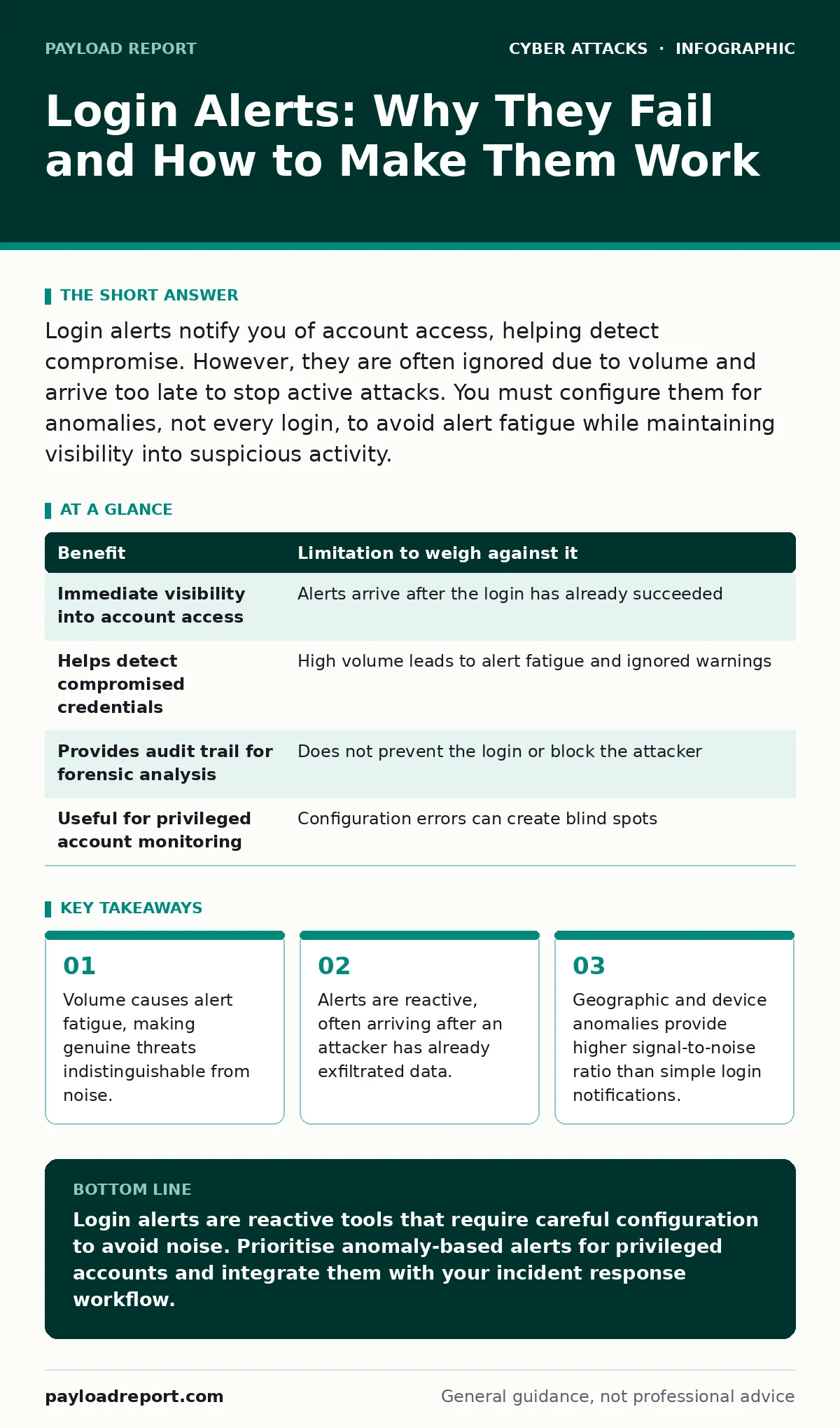
Login alerts notify you of account access, helping detect compromise. However, they are often ignored due to volume and arrive too late to stop active attacks. You must configure them for anomalies, not every login, to avoid alert fatigue while maintaining visibility into suspicious activity.
The Illusion of Control
You enable login alerts because you want to know when someone accesses your account. It feels like installing a burglar alarm. You expect a bell to ring the moment an intruder steps inside. In reality, the bell rings after the intruder has already taken what they wanted. Most default configurations notify you of every successful login. This creates a constant stream of notifications that you quickly learn to ignore. The mechanism is simple: the authentication server logs the event and sends a message to your registered contact method. The trade-off is immediate. You gain visibility, but you lose attention. When every login triggers an alert, the brain stops processing the information. This is known as alert fatigue. You stop checking the notifications because most of them are benign. The attacker knows this. They wait for the noise to drown out the signal.
Imagine you receive an alert that your account was accessed from your usual location. You dismiss it without reading the details. Ten minutes later, the same account is used to send phishing emails to your colleagues. By the time you notice the secondary damage, the initial login alert is buried under dozens of others. This is the hidden cost of broad alerting. It creates a false sense of security. You believe you are protected because you are notified. In truth, you are merely informed too late.
Signal Versus Noise
The core problem with login alerts is not the technology. It is the threshold for triggering the alert. A standard alert fires on success. It does not care who logged in, where they are, or what they did next. It only cares that the password was correct. This is useful for auditing, but terrible for security operations. You need to distinguish between expected behaviour and anomalies. An anomaly is an event that deviates from the established pattern of normal activity for that user. If you log in from your home office every day, a login from a different continent is an anomaly. A login from your home office at 3:00 AM might also be an anomaly. Configuring alerts to trigger only on anomalies reduces the volume significantly. It forces you to look at the notifications that matter.
However, defining "normal" is difficult. Users travel. They change devices. They work odd hours. If your definition of normal is too strict, you will block legitimate users. This is the edge case of strict anomaly detection. You risk locking out your own team while trying to catch an attacker. The balance lies in multi-factor analysis. You do not just look at location. You look at the device fingerprint, the time of day, and the application being accessed. When these factors combine in an unexpected way, the alert fires. This is more complex to set up, but it is the only way to make alerts actionable.
The Anatomy of a Useful Alert
A useful alert contains specific data points. It tells you the IP address, the geolocation, the device type, and the timestamp. It does not just say "Login successful." It provides the context needed for investigation. When you receive an alert, you need to know if the device is trusted. Most identity providers maintain a list of known devices for each user. If a new device logs in, the alert should highlight this. You should also consider the risk score assigned by the identity platform. This score aggregates various signals to determine the likelihood of compromise. If the score is high, the alert should demand immediate attention. If it is low, it can be reviewed later.
You must also consider the channel of delivery. Email is convenient but slow. It sits in an inbox alongside marketing newsletters and spam. Push notifications to a mobile device are faster. They interrupt the user, forcing a decision. However, push notifications can be spoofed or intercepted if the mobile device itself is compromised. SMS is another option, but it is vulnerable to SIM swapping attacks. If an attacker controls your phone number, they can intercept your two-factor authentication codes and your login alerts. Therefore, the delivery method must be as secure as the account it protects.
When It Is Worth It
Login alerts are worth it when they are part of a layered defence. They are not a standalone security control. They work best when combined with other measures. For example, if you use multi-factor authentication, login alerts serve as a secondary check. If MFA is bypassed or stolen, the alert might be the only thing that tells you something is wrong. They are also worth it for privileged accounts. System administrators, finance teams, and executives hold keys to the kingdom. Any anomalous login for these users requires immediate investigation. The cost of a missed alert is high. The volume is lower, so fatigue is less of a risk.
They are also valuable for detecting credential stuffing attacks. These attacks involve using lists of stolen credentials to try and gain access. If you see multiple failed logins followed by a successful login from a new location, the alert tells you the attack succeeded. You can then reset the password and revoke active sessions. Without the alert, you might not notice the breach until the attacker has accessed sensitive data. In this scenario, the alert provides the time needed to respond. It turns a silent breach into a visible event.
| Benefit | Limitation to weigh against it |
|---|---|
| Immediate visibility into account access | Alerts arrive after the login has already succeeded |
| Helps detect compromised credentials | High volume leads to alert fatigue and ignored warnings |
| Provides audit trail for forensic analysis | Does not prevent the login or block the attacker |
| Useful for privileged account monitoring | Configuration errors can create blind spots |
When It Is Not Worth It
Login alerts are not worth it if you cannot act on them. If your organisation lacks a security operations team, an alert is just noise. You need someone to investigate the alert. If you receive an alert at 2:00 AM and no one is watching, the value is zero. The attacker continues their work. You discover the breach days later when the damage is done. In this case, you are better off investing in stronger preventative controls. Focus on enforcing multi-factor authentication everywhere. Use conditional access policies to block logins from untrusted locations. These measures stop the attack before it starts. Alerts are for when prevention fails. If you have no response capability, prevention is your only option.
They are also not worth it for low-risk accounts. If an account has no sensitive data and no administrative privileges, the cost of monitoring outweighs the benefit. You will spend more time managing false positives than you will saving from breaches. For these accounts, standard password policies and basic MFA are sufficient. Do not clutter your security dashboard with alerts for accounts that do not matter. Prioritise your resources. Focus on the identities that hold the keys.
See also: Rainbow Table Attack Response: Contain, Recover and Prevent Credential Theft
Configuring for Success
To make login alerts effective, you must configure them carefully. Start by disabling all default alerts. They are too broad. Then, enable alerts for specific high-risk events. These include logins from new countries, logins from new devices, and logins after a password change. You should also alert on impossible travel. This is when a user logs in from two locations that are too far apart to be reached in the time between logins. This is a strong indicator of account compromise.
You should also integrate alerts with your incident response process. An alert should trigger a workflow. It should assign the alert to a specific analyst. It should include steps for investigation. If the analyst confirms the login is malicious, the workflow should include steps for containment. This might involve disabling the account, forcing a password reset, or revoking tokens. Without this integration, the alert is just an email. It does not lead to action. Action is what stops the attacker.
Beyond the Login
Login alerts are just one piece of the puzzle. They focus on the identity layer. You must also protect the data and the infrastructure. For example, if an attacker gains access to your email, they can use it to perform vendor email compromise. They impersonate suppliers to trick your finance team into paying fraudulent invoices. Login alerts might tell you the email was accessed, but they will not stop the fraud. You need other controls to detect and prevent this.
Similarly, if an attacker accesses a user account, they might install malware. This malware could be used to perform formjacking. This is when malicious code intercepts data entered into web forms, such as credit card details. Login alerts will not detect this. You need endpoint detection and response tools to find the malware. You also need web application firewalls to block the malicious scripts. Login alerts are necessary, but they are not sufficient. They must be part of a broader security strategy.
Consider also the threat of phishing kits. These are pre-built tools that attackers use to create fake login pages. If a user enters their credentials on a fake page, no login alert will fire. The attacker has the credentials, but the legitimate system sees no login. To defend against this, you must train users to recognise phishing attempts. You should also use DNS filtering to block access to known malicious domains. This stops the user from reaching the fake page in the first place.
Key takeaways
- Volume causes alert fatigue, making genuine threats indistinguishable from noise.
- Alerts are reactive, often arriving after an attacker has already exfiltrated data.
- Geographic and device anomalies provide higher signal-to-noise ratio than simple login notifications.
Login alerts are reactive tools that require careful configuration to avoid noise. Prioritise anomaly-based alerts for privileged accounts and integrate them with your incident response workflow.
Frequently asked questions
Should I enable login alerts for all users?
No. Enable them for privileged accounts and high-risk roles. For general users, focus on anomaly detection to reduce noise and prevent alert fatigue.
How do I stop alert fatigue?
Configure alerts to trigger only on anomalies, such as new devices or locations. Disable alerts for routine logins from trusted sources. Review and refine your rules regularly.
What should I do when I receive a suspicious login alert?
Investigate the alert immediately. Verify if the login was legitimate. If not, reset the password, revoke active sessions, and check for further compromise.
Do login alerts protect against password theft?
No. Alerts notify you of access, but they do not prevent the theft. Use multi-factor authentication and strong password policies to prevent credential compromise.
How this guide was produced: written by the Payload Report editorial team with AI assistance, checked against the public references listed below, and reviewed when the facts change. See our editorial policy or report an error.