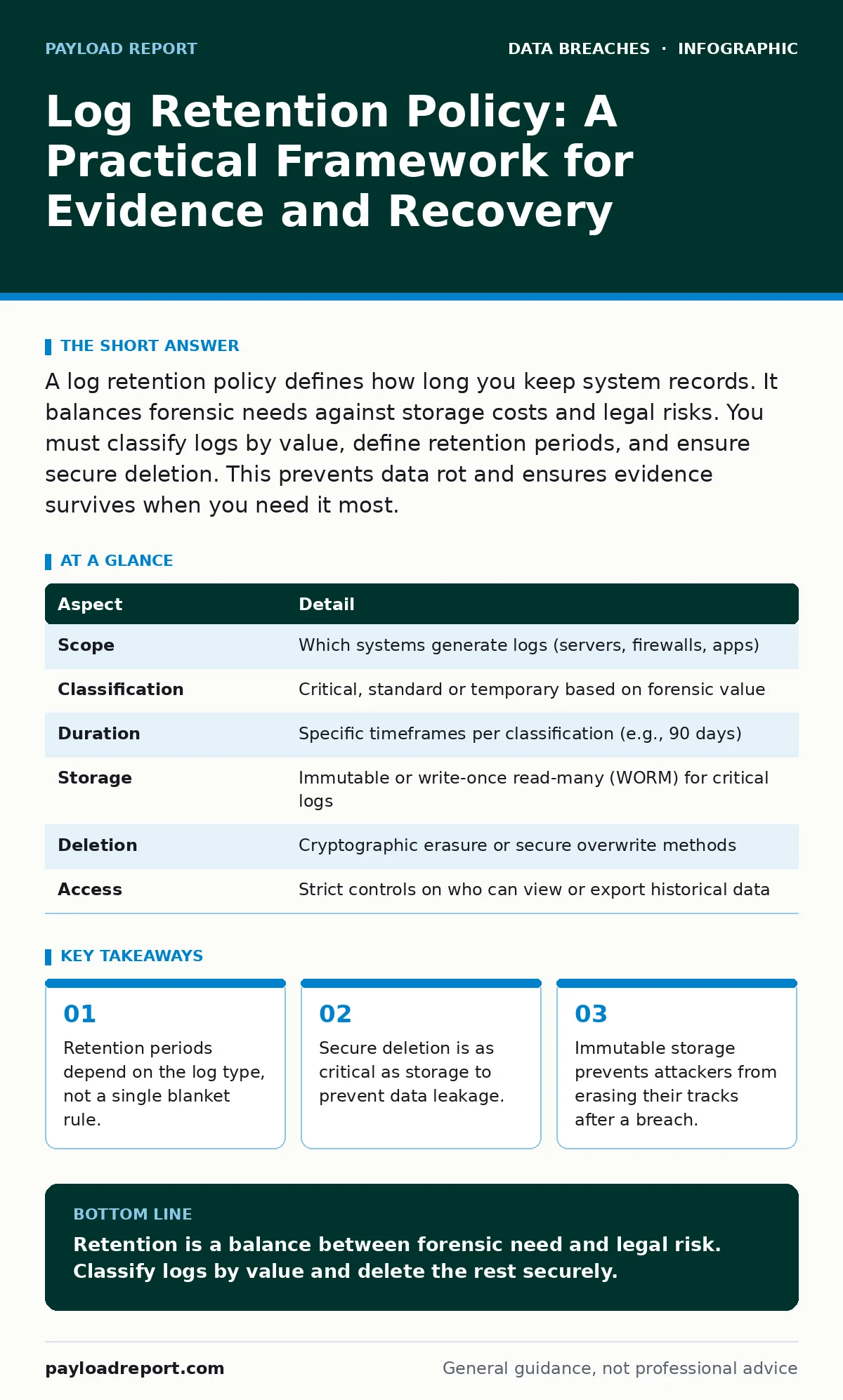
A log retention policy defines how long you keep system records. It balances forensic needs against storage costs and legal risks. You must classify logs by value, define retention periods, and ensure secure deletion. This prevents data rot and ensures evidence survives when you need it most.
The Library Analogy
Imagine a library that keeps every book ever written forever. The shelves would collapse under the weight. Now imagine a library that burns every book after one week. No researcher could ever prove a historical fact. Log retention sits between these extremes. You need enough history to solve problems, but not so much that you drown in noise. This balance determines your security posture.
What Is a Log Retention Policy?
A log retention policy dictates how long an organisation stores operational records. These records include access attempts, system errors and network traffic. The policy answers three questions: what to keep, how long to keep it, and how to destroy it. Without this framework, data accumulates randomly. This randomness creates blind spots during investigations and unnecessary costs during normal operations.
| Aspect | Detail |
|---|---|
| Scope | Which systems generate logs (servers, firewalls, apps) |
| Classification | Critical, standard or temporary based on forensic value |
| Duration | Specific timeframes per classification (e.g., 90 days) |
| Storage | Immutable or write-once read-many (WORM) for critical logs |
| Deletion | Cryptographic erasure or secure overwrite methods |
| Access | Strict controls on who can view or export historical data |
How Retention Works in Practice
Logs are generated continuously by almost every digital system. A firewall records packet headers. A database records query execution. An application records user actions. These streams must be aggregated into a central repository. The retention policy applies rules at ingestion. High-value logs, such as authentication failures, are kept longer. Low-value logs, such as routine health checks, are discarded sooner. This tiered approach manages storage efficiently.
The mechanism relies on timestamps. Each log entry receives a creation time. The system compares this time against the retention threshold. When the threshold is reached, the entry is scheduled for deletion. This process must be automated. Manual deletion is error-prone and inconsistent. Automation ensures that the policy is applied uniformly across all data sources.
Who Is Affected by Log Retention
Security teams rely on logs for incident response. They need historical data to reconstruct an attack timeline. If logs are missing, the investigation stalls. Legal teams require logs for compliance and litigation. They need to prove that security measures were in place. If logs are deleted prematurely, the organisation loses its defence. Operations teams care about performance. Excessive logging slows down systems. Poor retention policies create storage bottlenecks. Every department feels the impact of this decision.
Log Retention Policy Implementation
Building a log retention policy requires classification first. Not all data has equal value. Identify logs that prove identity verification. These are critical. Identify logs that show system stability. These are standard. Identify logs that show minor user clicks. These are temporary. Assign a duration to each class. Critical logs might stay for years. Standard logs might stay for months. Temporary logs might stay for days.
Next, choose the storage medium. Critical logs should reside in immutable storage. This prevents modification or deletion by any user, including administrators. This is vital for forensic integrity. Standard logs can use standard cloud storage. Temporary logs can use local disk space. Finally, define the deletion method. Simple file deletion is insufficient for sensitive data. Use cryptographic erasure or secure overwrite tools. This ensures the data cannot be recovered by attackers or competitors.
See also: Rainbow Table Attack Response: Contain, Recover and Prevent Credential Theft
Common Mistakes in Retention Planning
Many organisations adopt a one-size-fits-all approach. They keep all logs for one year. This is wasteful for low-value data and risky for high-value data. Another common error is ignoring the cost of e-discovery. When a lawsuit occurs, you must produce relevant logs. If you keep terabytes of irrelevant data, searching for the relevant bits takes weeks. This delays legal proceedings and increases legal fees.
A hidden cost is the risk of insider threats. Long retention periods give malicious insiders more time to find and exfiltrate sensitive data. If you keep logs for ten years, an insider has a decade to access them. Shortening retention for non-critical logs reduces this attack surface. You must also consider the legal right to be forgotten. Some jurisdictions require deletion of personal data upon request. Your policy must accommodate this requirement without breaking forensic chains.
Integrating with Related Controls
Log retention does not exist in isolation. It must work with encryption at rest. If logs are stored unencrypted, a storage breach exposes years of sensitive activity. Encryption ensures that stolen logs remain unreadable. It also pairs with user access provisioning. If an employee leaves, their access to log systems must be revoked immediately. Otherwise, they can delete or alter logs before their departure is noticed.
Consider database activity monitoring alongside retention. This tool detects suspicious queries in real-time. It generates high-priority logs that require longer retention. Standard SQL logs can be discarded sooner. This integration ensures that you keep the right data. It also complements the 3-2-1 backup rule. Backups are for recovery; logs are for accountability. Do not confuse the two. Backups should not be used as a substitute for structured log retention.
The Hidden Cost of Forever
Keeping logs forever sounds safe, but it is not. It creates a massive liability. If your storage is breached, years of sensitive data are exposed. This increases the severity of the breach. It also increases the cost of compliance. Auditors must review more data. Lawyers must review more data. This slows down every process. The goal is not to keep everything. The goal is to keep what matters. Define "matters" clearly. Delete the rest securely. This reduces risk and cost simultaneously.
Imagine a company that keeps web server logs for five years. A minor script error in year one generates millions of logs. These logs consume storage and processing power. They distract analysts during real incidents. By classifying these as temporary and deleting them after 30 days, the company frees up resources. It focuses on the logs that actually indicate compromise. This is the essence of effective retention.
Key takeaways
- Retention periods depend on the log type, not a single blanket rule.
- Secure deletion is as critical as storage to prevent data leakage.
- Immutable storage prevents attackers from erasing their tracks after a breach.
Retention is a balance between forensic need and legal risk. Classify logs by value and delete the rest securely.
Frequently asked questions
How long should I keep authentication logs?
Keep authentication logs for at least 90 days, or longer if required by specific industry regulations. These logs are critical for proving who accessed your systems.
Can I use backups for log retention?
Backups are for system recovery, not forensic analysis. They are not searchable and may not contain the specific log entries you need. Use dedicated log management systems.
What happens if I delete logs prematurely?
You lose the ability to investigate incidents. This can lead to inability to prove compliance, inability to identify the root cause of a breach, and increased liability in legal proceedings.
Is immutable storage necessary for all logs?
Immutable storage is necessary for high-value logs like authentication and administrative actions. Standard operational logs can use standard storage with access controls.
How this guide was produced: written by the Payload Report editorial team with AI assistance, checked against the public references listed below, and reviewed when the facts change. See our editorial policy or report an error.