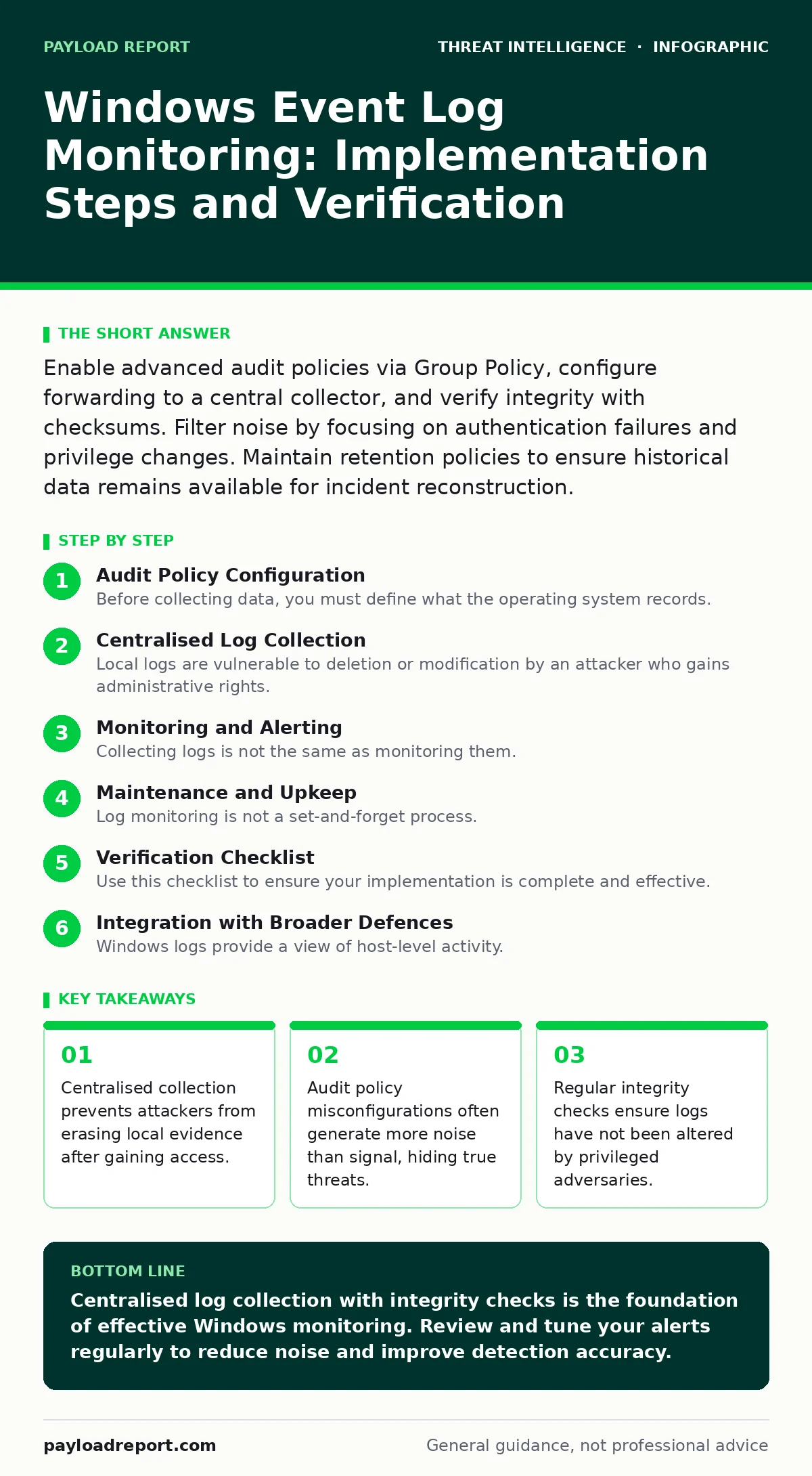
Enable advanced audit policies via Group Policy, configure forwarding to a central collector, and verify integrity with checksums. Filter noise by focusing on authentication failures and privilege changes. Maintain retention policies to ensure historical data remains available for incident reconstruction.
Audit Policy Configuration
Before collecting data, you must define what the operating system records. Windows generates thousands of events, but most are irrelevant to security operations. You need to enable specific audit subcategories through Group Policy. This ensures every machine in your environment logs the same actions consistently. Focus on account logon, logoff, privilege use, and process creation. These categories capture the movement of an attacker within your network.
If you enable process creation logging on every endpoint, you will generate massive volumes of data. This can overwhelm your storage and analysis tools. Balance visibility with performance by excluding known benign processes where possible. Define a clear policy that distinguishes between operational noise and security-relevant events.
Centralised Log Collection
Local logs are vulnerable to deletion or modification by an attacker who gains administrative rights. You must forward logs to a centralised storage system immediately. Use Windows Event Forwarding to send data to a dedicated collector server. This separation ensures that even if an endpoint is compromised, the evidence of the compromise remains safe elsewhere.
Configure the forwarding rules to match the audit policies you enabled earlier. Use secure channels to protect data in transit. Ensure the collector has sufficient storage capacity for your retention period. A common oversight is configuring forwarding but failing to verify that the collector is actually receiving the data.
Step 1: Define Audit Policy Scope
Identify the specific event IDs you need to monitor. Event ID 4624 records successful logons, while 4625 records failures. Event ID 4672 tracks special privileges assigned to new logons. Map these IDs to your security requirements. Do not enable every available ID; this creates unnecessary overhead.
Verify the policy by running a local audit command on a test machine. Check that the expected events appear in the local log viewer. If the events are missing, your Group Policy has not applied correctly.
- Audit Logon enabled
- Audit Process Creation enabled
- Audit Privilege Use enabled
Step 2: Configure Event Forwarding
Set up a collector server that is separate from your production workloads. Install the Windows Event Collector service on this machine. Create subscription rules that pull logs from your domain controllers and critical servers. Use Kerberos authentication for the channel to ensure only authorised systems can send logs.
Test the connection by generating a test event on a source machine. Check the collector to see if the event arrives within seconds. If it does not, check the firewall rules between the source and collector. Ensure the subscription is active and the source machine is permitted to connect.
- Collector service running
- Subscription created and active
- Firewall rules allowing traffic
Step 3: Validate Data Integrity
Logs are only useful if they are accurate. Attackers with high privileges can alter local logs to cover their tracks. Implement integrity checks to detect tampering. Use cryptographic hashes to verify that logs have not been modified since they were generated.
Compare the hash of the log file on the source with the hash on the collector. If they differ, investigate immediately. This step is critical for legal and forensic purposes. Without integrity verification, your logs may be inadmissible in court or unreliable for incident response.
- Hash verification process defined
- Tamper detection alerts configured
- Backup logs stored securely
Monitoring and Alerting
Collecting logs is not the same as monitoring them. You need to analyse the data for patterns that indicate malicious activity. Set up alerts for specific event sequences. For example, multiple failed logons followed by a successful logon may indicate a brute-force attack.
Correlate events across different systems. An attacker might move laterally by using stolen credentials. Look for the same credential being used from different source IPs. This requires a system that can join data from multiple sources.
Consider the impact of pass-the-hash attacks in your monitoring strategy. These attacks allow an adversary to authenticate without knowing the plaintext password. Your logs may show successful logons without corresponding password validation events. Detecting this requires specific attention to authentication methods recorded in the logs.
Maintenance and Upkeep
Log monitoring is not a set-and-forget process. You must regularly review and update your rules. New software and services may generate new types of events. Update your audit policies to include these new sources if they are security-relevant.
Keeping data longer than necessary increases storage costs and search times. However, ensure you retain enough history to investigate incidents that may have gone unnoticed for some time.
Review false positives regularly. If an alert triggers for every scheduled backup, it will lose its value. Refine your rules to exclude known benign activity. This keeps your team focused on genuine threats.
Verification Checklist
Use this checklist to ensure your implementation is complete and effective. Run this check after initial setup and after any major changes to your environment.
- Audit policies are consistent across all critical systems.
- Logs are forwarding to a central collector in real-time.
- Integrity checks are passing for all forwarded logs.
- Alerts are configured for high-severity events.
- False positives are being reviewed and tuned.
- Retention policies are enforced to manage storage.
See also: Process Injection: How Code Runs Without A Process · Honeytokens: Silent Traps for Insider Threats and Breaches
Integration with Broader Defences
Windows logs provide a view of host-level activity. To understand the full picture, you must integrate this data with other sources. Network traffic data can confirm if a logon event corresponds to actual network activity.
Consider how log tampering techniques might bypass your current controls. If an attacker can stop the logging service, your forwarding mechanism may not detect the gap. Monitor the status of the logging service itself as a security event.
For deeper insights, refer to our guide on purple teaming to test your detection capabilities. This collaborative approach helps identify gaps in your monitoring coverage. Additionally, understanding defense evasion tactics will help you anticipate how attackers might try to hide their actions in your logs.
Key takeaways
- Centralised collection prevents attackers from erasing local evidence after gaining access.
- Audit policy misconfigurations often generate more noise than signal, hiding true threats.
- Regular integrity checks ensure logs have not been altered by privileged adversaries.
Centralised log collection with integrity checks is the foundation of effective Windows monitoring. Review and tune your alerts regularly to reduce noise and improve detection accuracy.
Frequently asked questions
How long should I keep Windows event logs?
Retain logs for a period that meets your compliance requirements and operational needs. Longer retention helps with retrospective analysis but increases storage costs.
Can I monitor logs without a central server?
You can read local logs, but this leaves them vulnerable to tampering. Centralised collection is recommended for security and forensic integrity.
What is the biggest risk in log monitoring?
Alert fatigue from poor filtering. If you receive too many false positives, your team will ignore real threats.
How do I detect if logging is disabled?
Monitor the Security Log for events indicating policy changes or service stops. Alert immediately if these events occur outside of maintenance windows.
How this guide was produced: written by the Payload Report editorial team with AI assistance, checked against the public references listed below, and reviewed when the facts change. See our editorial policy or report an error.