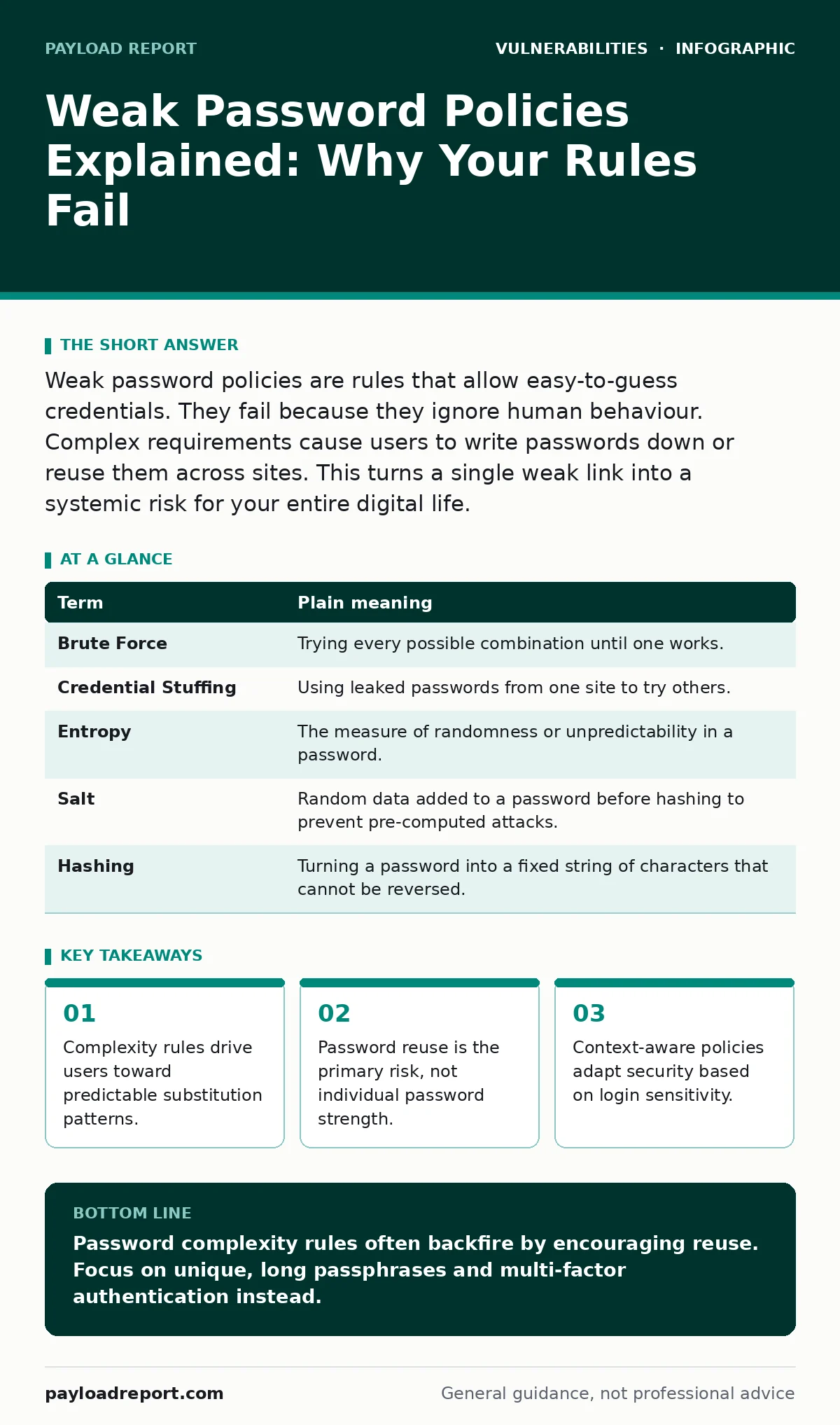
Weak password policies are rules that allow easy-to-guess credentials. They fail because they ignore human behaviour. Complex requirements cause users to write passwords down or reuse them across sites. This turns a single weak link into a systemic risk for your entire digital life.
The House Key Analogy
Imagine you live in a house with a single front door. You believe safety comes from a complicated lock. You buy a mechanism that requires twisting the key three times while holding your breath. It is difficult to operate. You grow frustrated with the effort.
Suppose you decide to make life easier. You buy five identical keys for that difficult lock. You leave one in the garden shed, one in the car, and one under a mat. The lock remains complex, but you have created five entry points. An intruder does not need to pick the complex lock. They simply find one of the spare keys.
This is how weak password policies work in the digital world. The policy is the lock mechanism. The user behaviour is the key management. If the policy makes the lock too hard to use, users will scatter spare keys everywhere. They will reuse the same password across email, banking, and social media. One breach unlocks the entire house.
The Mechanics of Poor Policy
A password policy is a set of rules enforced by a system. It dictates length, complexity, and expiry. Many organisations mandate frequent changes and complex character mixes. This seems logical. It assumes that a harder password is a safer password.
This assumption fails because it ignores the human element. When you are forced to create a password with numbers, symbols, and mixed case every ninety days, you cannot memorise it. You must write it down. You must use a predictable pattern. You might change "Password1" to "Password2". This is called incremental change. Attackers expect this. They do not guess random strings. They guess predictable shifts.
The Hidden Cost of Complexity
Strict rules create a hidden cost. This cost is the adoption of bad habits. Users face a choice: follow the rules and suffer, or break the rules and survive. Most choose survival. They use a password manager, which is good. But many do not. They use the same password everywhere.
This is the core danger of weak policy design. The policy focuses on the password itself, not the context. Logging into a forum should not require the same effort as logging into your bank. By applying the same high bar everywhere, you force users to reuse credentials. If the forum is breached, your bank is next. The complexity of the password does not matter. The reuse does.
Glossary of Terms
| Term | Plain meaning |
|---|---|
| Brute Force | Trying every possible combination until one works. |
| Credential Stuffing | Using leaked passwords from one site to try others. |
| Entropy | The measure of randomness or unpredictability in a password. |
| Salt | Random data added to a password before hashing to prevent pre-computed attacks. |
| Hashing | Turning a password into a fixed string of characters that cannot be reversed. |
Better Habits for Users
You can mitigate these risks without changing your organisation’s policy. Start by breaking the link between accounts. Use a unique password for every service. This stops a breach on one site from affecting others. This is the single most effective step you can take.
Second, use a passphrase. A passphrase is a sequence of random words. "Correct-Horse-Battery-Staple" is easier to remember than "P@ssw0rd!". It has high entropy because it is long. Length is more effective than complexity. Attackers struggle with length more than they struggle with symbols.
Third, enable multi-factor authentication. This adds a second step to login. Even if your password is stolen, the attacker cannot enter without the second factor. This is critical for high-value accounts. It addresses the failure of the password alone.
Steps to Try Now
- Audit your reuse. Check if you use the same password on more than one site. If you do, change it immediately. Use a unique password for each.
- Lengthen your secrets. Change short passwords to long passphrases. Aim for four random words. This increases entropy significantly.
- Enable second factors. Turn on multi-factor authentication for email and banking. Use an authenticator app or hardware key. Avoid SMS if possible.
The Bigger Picture
Weak password policies are a symptom of a larger issue. They reflect a misunderstanding of security. Security is not just about technical controls. It is about human behaviour. You cannot out-engineer bad habits. You must design for them.
Organisations should look at their attack surface. Every account with a weak password is a potential entry point. They should consider authentication bypass vulnerabilities where attackers skip password checks entirely. Regular penetration testing can reveal these gaps. It simulates real attacks to find weaknesses before criminals do.
You can also explore bug bounty programs. These invite ethical hackers to find flaws. It crowdsources security testing. For software teams, secure code review ensures that authentication logic is sound from the start. This prevents structural weaknesses.
In the world of connected devices, IoT device vulnerabilities are often due to default passwords. These devices rarely allow strong policies. You must change them manually. For supply chain risks, a software bill of materials (SBOM) helps track components. It ensures that third-party libraries do not introduce weak authentication.
Finally, security regression testing ensures that new updates do not break existing security. It maintains the integrity of your defences over time. Weak policies are a starting point. The goal is a system that is hard to breach, even if a password is lost.
Key takeaways
- Complexity rules drive users toward predictable substitution patterns.
- Password reuse is the primary risk, not individual password strength.
- Context-aware policies adapt security based on login sensitivity.
Password complexity rules often backfire by encouraging reuse. Focus on unique, long passphrases and multi-factor authentication instead.
Frequently asked questions
How long should a password be?
Aim for at least twelve characters. Longer is better. A passphrase of four random words is ideal.
Is it safe to use a password manager?
Yes. It is safer than reusing passwords. The manager encrypts your data, protecting it from most threats.
What is multi-factor authentication?
It requires two forms of proof. Usually something you know (password) and something you have (phone or key).
Do I need to change passwords regularly?
No. Only change them if you suspect a breach. Frequent changes encourage weak, predictable passwords.
How this guide was produced: written by the Payload Report editorial team with AI assistance, checked against the public references listed below, and reviewed when the facts change. See our editorial policy or report an error.