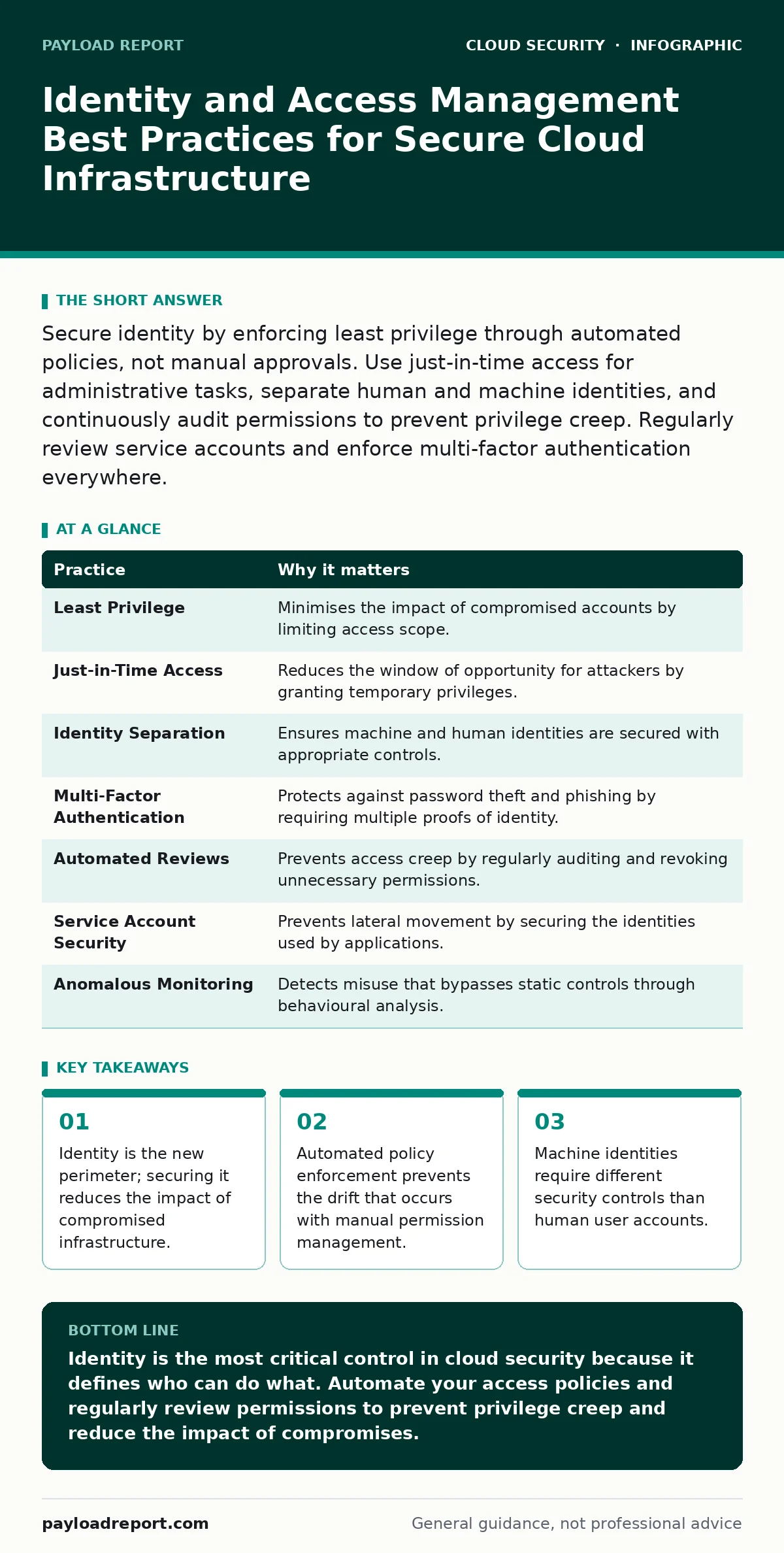
Secure identity by enforcing least privilege through automated policies, not manual approvals. Use just-in-time access for administrative tasks, separate human and machine identities, and continuously audit permissions to prevent privilege creep. Regularly review service accounts and enforce multi-factor authentication everywhere.
Treat Identity as the Primary Security Boundary
Cloud infrastructure has no physical walls. The traditional network perimeter, defined by firewalls and gateways, has dissolved into a distributed mesh of services. In this environment, identity becomes the primary control point. Every request to a cloud resource must be authenticated and authorised before it proceeds. If you cannot verify who is asking, you cannot trust the action.
This shift requires a fundamental change in how you design security. You stop thinking about blocking external traffic and start thinking about verifying internal intent. This approach aligns closely with the principles found in secure access service edge (SASE) architectures, where identity drives policy rather than IP address. When identity is weak, every other security layer becomes a suggestion rather than a rule.
Enforce Least Privilege Through Policy, Not Permission
Least privilege means granting users and services only the access they need to perform their current task, and nothing more. The most common failure here is the initial grant. Administrators often assign broad roles to ensure a user can start working immediately. This creates a baseline of excess access that rarely gets removed.
The cost of excess access is technical debt. Every unnecessary permission is a potential attack vector that persists long after the original need has passed. You must define roles based on job functions, not individual requests. Map these roles to policy-as-code frameworks. This allows you to version control your access rules and review changes as easily as you review application code.
1. Define granular roles for specific job functions
Avoid generic roles like "Admin" or "Editor" for cloud resources. Instead, create roles such as "Database Reader" or "Log Writer". This ensures that even if an account is compromised, the attacker has limited scope.
Implement Just-in-Time Access for Administrative Tasks
Permanent administrative access is a liability. It remains active even when the administrator is on leave, leaves the company, or falls asleep. Just-in-time access grants elevated privileges only for a specific duration and purpose. When the time expires, the access vanishes automatically.
This method reduces the window of opportunity for an attacker who has stolen credentials. It also creates a clear audit trail for every privileged action. You can see exactly who accessed what, when, and why. This is particularly useful for emergency maintenance or incident response, where broad access is temporarily required but dangerous if left open.
Separate Human and Machine Identities
Humans and machines interact with cloud systems in fundamentally different ways. Humans log in, view dashboards, and click buttons. Machines run scripts, trigger pipelines, and manage infrastructure at scale. They require different security controls. A human identity needs multi-factor authentication and session timeouts. A machine identity needs short-lived tokens and strict scope limitations.
Conflating these two types of identities leads to poor security hygiene. For example, using a human username and password in a deployment script is a common anti-pattern. It exposes credentials in configuration files and makes rotation difficult. Instead, use service accounts or managed identities for machines. These identities are tied to the resource itself, not a person, and can be rotated or revoked without disrupting human workflows.
Enforce Multi-Factor Authentication Everywhere
Multi-factor authentication requires two or more proofs of identity to grant access. Typically, this combines something you know (a password) with something you have (a mobile device or hardware key). This adds a layer of defence that protects against password theft, phishing, and credential stuffing attacks.
The challenge is coverage. Enabling multi-factor authentication for administrative accounts is standard. Extending it to all user accounts and service integrations is often overlooked. Some legacy applications or internal tools may not support modern authentication protocols. In these cases, consider using a reverse proxy or an identity provider that can inject the required authentication step before the request reaches the application.
See also: Denial of Wallet Attacks: Debunking Common Myths About Cloud Cost Abuse · Secure Access Service Edge for Small Teams: A Practical Setup
Automate Access Reviews and Revocation
Access creep occurs when permissions accumulate over time. A user may need access to a staging environment for a project, then move to production, but never have the staging access removed. Over months or years, this results in a bloated set of permissions that no longer matches reality.
Manual reviews are ineffective because they are time-consuming and prone to error. Automate the process by integrating your identity provider with your cloud resource manager. Set up regular, automated checks that compare current permissions against baseline policies. Flag any deviations for review. If an access right has not been used in a defined period, revoke it automatically. This keeps the attack surface small and manageable.
Secure Service Accounts and API Keys
Service accounts are identities used by applications to interact with cloud services. They often have high privileges and are used in automated processes. If an attacker compromises a service account, they can move laterally through your infrastructure without triggering human-focused alerts.
Treat service accounts with the same rigour as human accounts. Do not store API keys in source code repositories. Use secret management solutions to inject keys at runtime. Rotate keys frequently and monitor for unusual usage patterns. For example, a service account that suddenly starts accessing resources in a different region or at an unusual time should trigger an alert.
Monitor for Anomalous Identity Behaviour
Static controls like passwords and roles are necessary but insufficient. You need dynamic monitoring to detect misuse. Identity and access management systems generate vast amounts of log data. Analysing this data can reveal patterns that indicate compromise.
Look for anomalies such as logins from unusual locations, access at unusual times, or rapid escalation of privileges. Machine learning algorithms can help identify these patterns by establishing a baseline of normal behaviour for each identity. Deviations from this baseline can trigger automated responses, such as forcing re-authentication or blocking access pending investigation. This proactive approach helps catch attacks that bypass static controls.
| Practice | Why it matters |
|---|---|
| Least Privilege | Minimises the impact of compromised accounts by limiting access scope. |
| Just-in-Time Access | Reduces the window of opportunity for attackers by granting temporary privileges. |
| Identity Separation | Ensures machine and human identities are secured with appropriate controls. |
| Multi-Factor Authentication | Protects against password theft and phishing by requiring multiple proofs of identity. |
| Automated Reviews | Prevents access creep by regularly auditing and revoking unnecessary permissions. |
| Service Account Security | Prevents lateral movement by securing the identities used by applications. |
| Anomalous Monitoring | Detects misuse that bypasses static controls through behavioural analysis. |
Key takeaways
- Identity is the new perimeter; securing it reduces the impact of compromised infrastructure.
- Automated policy enforcement prevents the drift that occurs with manual permission management.
- Machine identities require different security controls than human user accounts.
Identity is the most critical control in cloud security because it defines who can do what. Automate your access policies and regularly review permissions to prevent privilege creep and reduce the impact of compromises.
Frequently asked questions
How do I handle legacy applications that do not support modern identity protocols?
Use an identity provider or reverse proxy that can enforce authentication before the request reaches the legacy application. This allows you to apply modern security controls without modifying the application code.
What is the difference between a service account and a managed identity?
A service account is a user identity created for an application, often requiring manual key management. A managed identity is a cloud-native identity that the platform manages, automatically rotating credentials and simplifying secure access to resources.
How often should I rotate API keys for service accounts?
Rotate keys as frequently as your operational processes allow, ideally automatically. Short-lived tokens are preferable to long-lived keys, as they limit the damage if a key is compromised.
Can multi-factor authentication protect against all types of identity attacks?
No, it primarily protects against credential theft. It does not protect against insider threats, compromised sessions, or vulnerabilities in the applications themselves. It must be part of a broader security strategy.
How this guide was produced: written by the Payload Report editorial team with AI assistance, checked against the public references listed below, and reviewed when the facts change. See our editorial policy or report an error.