Golden images often contain dormant malware, stale credentials, or unnecessary services that attackers exploit. You must verify the base image integrity, remove unused accounts, and enforce strict change controls to prevent these hidden entry points from compromising your entire infrastructure.
Mistake 1: Capturing the Image Before Full Patching
Why it hurts:
When you capture a golden image before applying the latest security updates, every machine deployed from that template starts with known vulnerabilities. Attackers scan for these specific unpatched flaws immediately after deployment. This creates a window of exposure where your endpoint detection and response (EDR) tools cannot mitigate threats that exploit missing patches. The image becomes a factory for vulnerable systems.
The fix:
Apply all critical security updates and verify their integrity before capturing the image. Use automated tools to confirm that no pending reboots or unfinished updates remain. Document the exact patch levels included in the image version. This ensures that every deployed machine starts with a known, secure baseline.
Mistake 2: Leaving Default or Test Accounts Active
Why it hurts:
Default administrative accounts and test user profiles often retain default passwords or weak credentials. Attackers target these known accounts using automated brute-force techniques. If a golden image contains an active test account with a simple password, ransomware can spread laterally across the network without needing to breach a primary user account. This bypasses many access controls that rely on unique, strong credentials.
The fix:
Disable all default accounts and remove any test or temporary user profiles before capturing the image. Ensure that password policies enforce complexity and rotation requirements. Use a secure provisioning script to create necessary service accounts during deployment, rather than baking them into the image. This reduces the number of static credentials an attacker can exploit.
Mistake 3: Including Unnecessary Software and Services
Why it hurts:
Every additional application or service increases the attack surface of the system. Unused software may contain vulnerabilities that are no longer patched by the vendor. Attackers often target obscure services because they are less likely to be monitored by security operations teams. A single vulnerable plugin in a rarely used application can provide the initial foothold for a computer virus to establish persistence.
The fix:
Audit the image for every installed application and service. Remove anything that is not strictly required for the machine’s primary function. Disable services that are not needed for daily operations. This principle of least functionality reduces the number of entry points available to attackers and simplifies monitoring efforts.
Mistake 4: Failing to Verify Image Integrity
Why it hurts:
Without cryptographic verification, you cannot be certain that the golden image has not been tampered with. An attacker who gains access to the image repository can inject malware directly into the template. This malware will then be deployed to every new machine, appearing as part of the legitimate operating system. Standard antivirus scans often miss this type of threat because it is embedded in the system files.
The fix:
Use digital signatures to verify the integrity of the golden image before deployment. Store images in a secure, access-controlled repository with audit logging. Regularly compare the hash of the stored image against a known good baseline. This ensures that any modification to the image is detected before it affects the fleet.
Mistake 5: Ignoring Registry and File System Artifacts
Why it hurts:
Previous installations or configuration changes often leave behind registry keys and temporary files. These artifacts can contain sensitive information or misconfigurations that weaken security. For example, a leftover configuration file might disclose database connection strings or API keys. Attackers search for these artifacts to gain deeper access to the network or to escalate privileges.
The fix:
Perform a thorough cleanup of registry keys, temporary files, and installation logs before capturing the image. Use system state analysis tools to identify and remove unnecessary artifacts. Ensure that no sensitive data remains in the system files. This clean state prevents accidental data leakage and reduces the noise in security monitoring tools.
See also: Spyware in Small Business: Hidden Risks and Practical Defences · Computer Viruses Explained: How Code Infects and Spreads
Mistake 6: Not Versioning the Image
Why it hurts:
Without clear versioning, you cannot trace which image version introduced a security issue. If a breach occurs, identifying the affected machines becomes a guessing game. This delays incident response and allows the threat to spread further. Lack of versioning also makes it difficult to roll back to a secure state if a new image contains a critical flaw.
The fix:
Implement a strict versioning scheme for all golden images. Include the date, patch level, and any significant changes in the version name. Maintain a history of image versions and their associated security configurations. This allows for rapid identification and remediation of affected systems during an incident.
Mistake 7: Skipping Pre-Deployment Scans
Why it hurts:
Deploying an image without a final security scan risks introducing known threats into the environment. Even if the image was secure when captured, it may have been compromised in storage. A pre-deployment scan acts as a final checkpoint to detect any anomalies. Skipping this step assumes that the storage environment is perfectly secure, which is rarely the case.
The fix:
Run a comprehensive security scan on the golden image before each deployment cycle. Use multiple detection engines to identify different types of threats, including potentially unwanted programs. Quarantine and investigate any flagged items before proceeding. This final verification step ensures that only clean images are used for deployment.
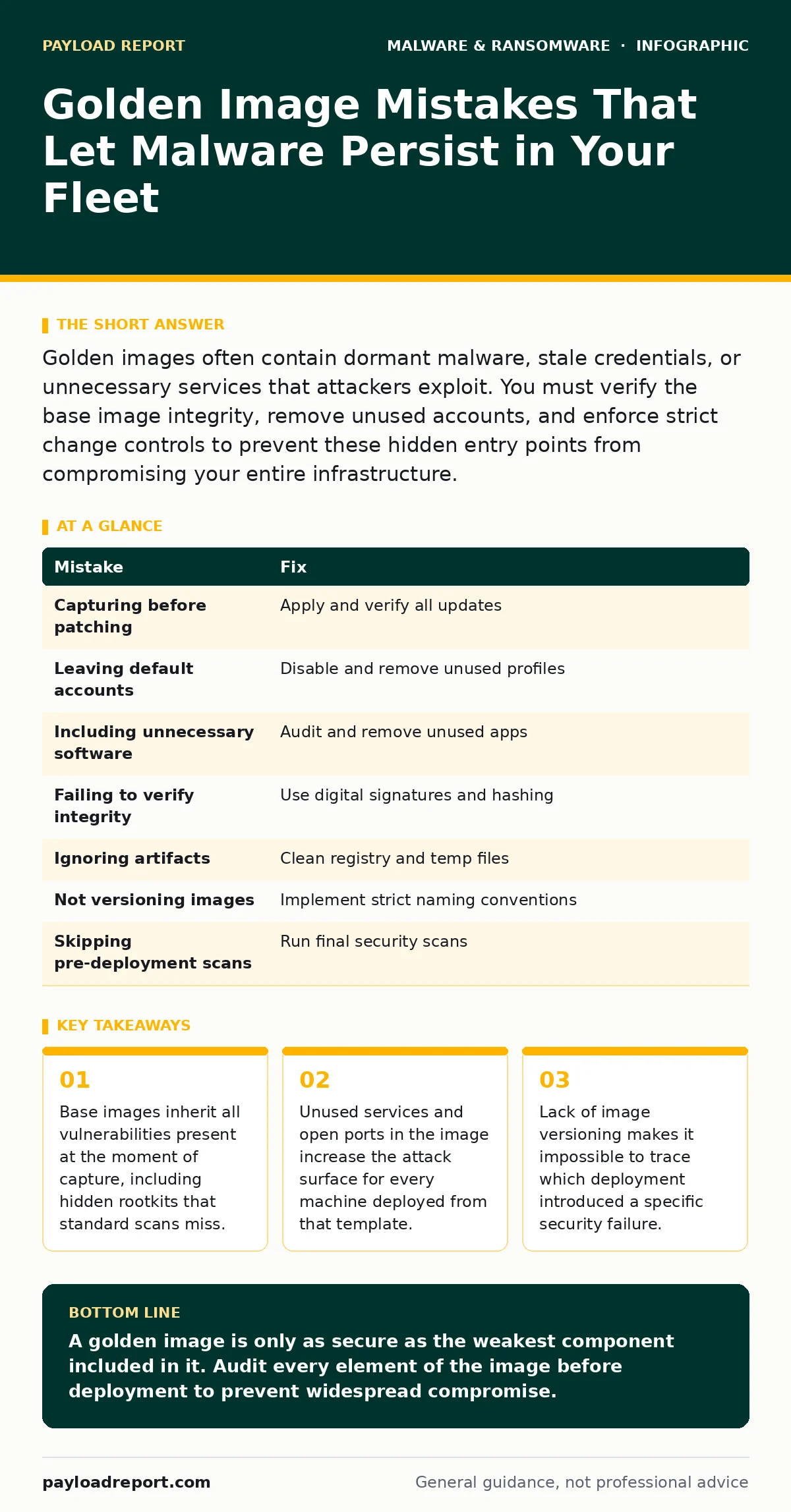
| Mistake | Fix |
|---|---|
| Capturing before patching | Apply and verify all updates |
| Leaving default accounts | Disable and remove unused profiles |
| Including unnecessary software | Audit and remove unused apps |
| Failing to verify integrity | Use digital signatures and hashing |
| Ignoring artifacts | Clean registry and temp files |
| Not versioning images | Implement strict naming conventions |
| Skipping pre-deployment scans | Run final security scans |
Key takeaways
- Base images inherit all vulnerabilities present at the moment of capture, including hidden rootkits that standard scans miss.
- Unused services and open ports in the image increase the attack surface for every machine deployed from that template.
- Lack of image versioning makes it impossible to trace which deployment introduced a specific security failure.
A golden image is only as secure as the weakest component included in it. Audit every element of the image before deployment to prevent widespread compromise.
Frequently asked questions
How often should I update my golden images?
Update images regularly, at least after every major security patch release or significant software change. This ensures that deployed machines start with the latest protections.
Can EDR tools detect malware in a golden image?
Standard EDR tools may miss malware embedded in the image itself, as they often focus on runtime behaviour. You need dedicated image scanning tools to detect these threats before deployment.
What is the difference between a golden image and a template?
A golden image is a pre-configured, hardened system image ready for deployment. A template is often a more generic starting point that requires further configuration. Golden images should be more secure and finalised.
How do I handle software licensing in golden images?
Use volume licensing and automated activation scripts. Avoid baking licence keys into the image, as this creates security risks. Ensure that compliance tools can verify licensing status on deployed machines.
How this guide was produced: written by the Payload Report editorial team with AI assistance, checked against the public references listed below, and reviewed when the facts change. See our editorial policy or report an error.