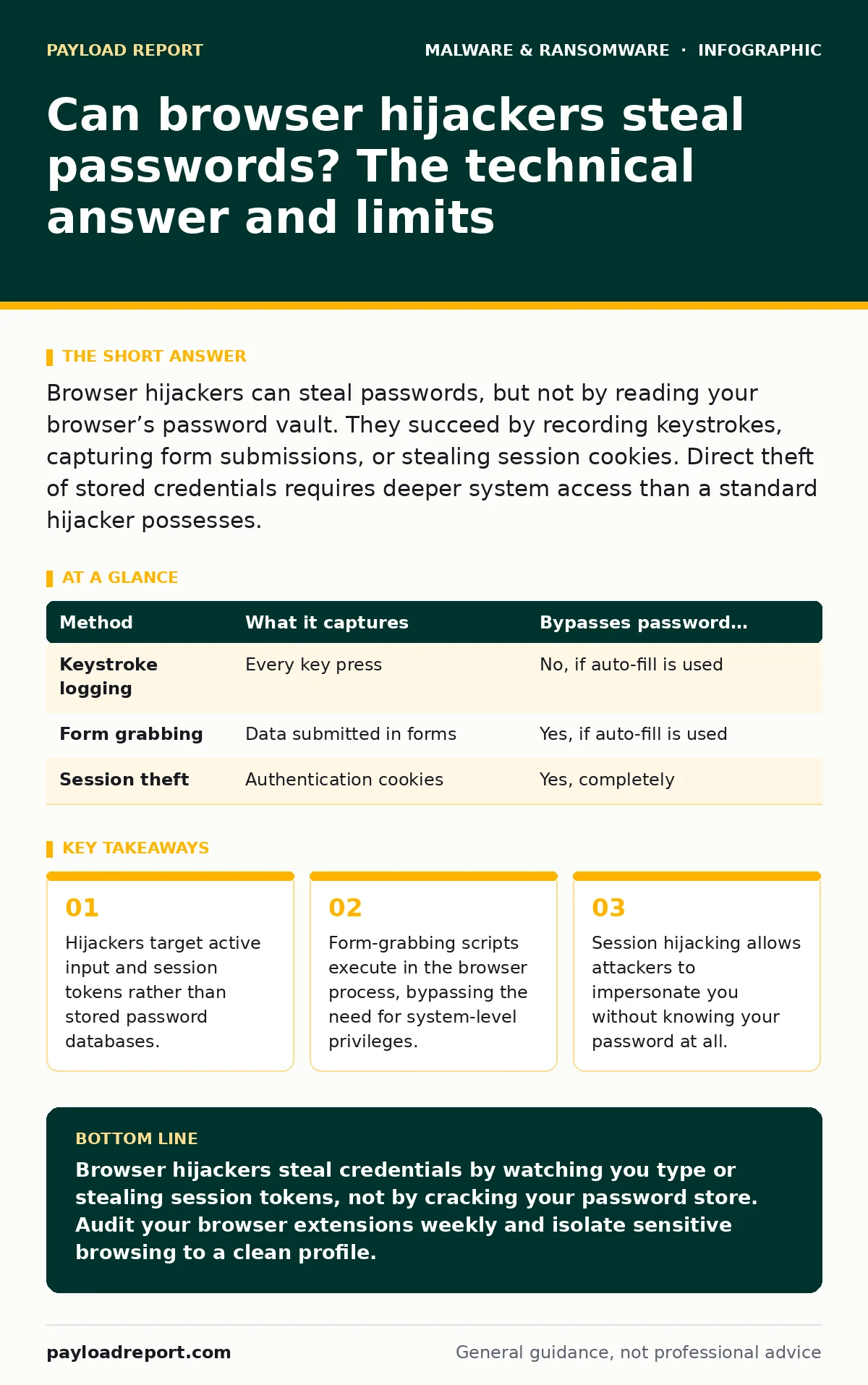
Browser hijackers can steal passwords, but not by reading your browser’s password vault. They succeed by recording keystrokes, capturing form submissions, or stealing session cookies. Direct theft of stored credentials requires deeper system access than a standard hijacker possesses.
Can browser hijackers steal passwords?
Browser hijackers can steal passwords, but they do so through indirect methods rather than direct extraction from storage. Most users assume that if a piece of software controls their browser, it can read the saved passwords. This assumption is incorrect for standard hijackers. These programs modify search engines and home pages. They lack the deep system permissions required to decrypt the browser’s master key. The threat comes from what the hijacker sees while you type, not what it reads from your hard drive.
The difference between viewing and stealing
A browser hijacker sits between you and the web. It can monitor every character you type into a search bar or a login field. This capability is known as keylogging. If you type your password into a field, the hijacker records it. It does not need to access the password file. It simply waits for you to provide the secret voluntarily. This distinction matters for detection. Keylogging activity looks like normal data transmission.
How do hijackers capture credentials?
Hijackers use three primary mechanisms to capture sensitive data. Understanding these methods reveals why standard password managers are not a complete shield. The first method is keystroke logging. The second is form grabbing. The third is session token theft. Each method exploits a different layer of the interaction between your computer and the website.
| Method | What it captures | Bypasses password manager? |
|---|---|---|
| Keystroke logging | Every key press | No, if auto-fill is used |
| Form grabbing | Data submitted in forms | Yes, if auto-fill is used |
| Session theft | Authentication cookies | Yes, completely |
Keystroke logging is the most straightforward approach. The hijacker installs a hook into the browser’s input handling. When you press a key, the hijacker sees it before the browser does. If you manually type your password, the hijacker records it. If your password manager auto-fills the field, the hijacker sees the result but not the individual keystrokes. This creates a false sense of security for users who rely solely on password managers without understanding the input method.
Form grabbing is more sophisticated. The hijacker injects a script into the page you are viewing. This script waits for you to click "Submit". When you do, it intercepts the data packet. It sends a copy of your username and password to the attacker’s server before sending the real data to the website. This method works regardless of whether you typed the password or used a manager. The hijacker sees the final payload.
Why session tokens are the real danger
Session tokens are the hidden cost of convenience. When you log into a website, the server gives you a cookie. This cookie proves you are who you say you are. You do not need to type your password again. A browser hijacker can copy this cookie. With the cookie, the attacker can log into your account without your password. This is called session hijacking. It renders password strength irrelevant. Even a twenty-character random password offers no protection if the attacker has your session token.
This method is particularly dangerous because it is silent. You do not get an alert for a failed login attempt. The attacker simply opens a new session. Your account remains active. The attacker performs actions in the background. You might not notice until financial transactions have occurred or data has been exfiltrated. This is why monitoring login locations is more effective than monitoring password changes.
Do password managers stop hijackers?
Password managers reduce the risk of keystroke logging, but they do not stop form grabbing or session theft. If you use a password manager, the software fills the field programmatically. No keystrokes are generated. A simple keylogger cannot capture the password. However, a form-grabbing script sees the filled field. It captures the data when you submit the form. The password manager did not protect you. It only changed the method of capture.
Imagine you use a password manager for your bank. You log in, and the manager fills the details. You click submit. A hijacker’s script intercepts the submission. The attacker now has your credentials. They can use them on other sites if you reuse passwords. Or they can use them to log in directly if the session token is not the primary authentication method. The password manager prevented one attack vector, but the hijacker adapted.
What privileges do hijackers need?
Browser hijackers typically operate with user-level privileges. They do not need administrator rights to install. This is why they are so common. They bundle with free software or hide in adware. They modify browser settings within the user’s profile. This limited access is why they cannot directly read encrypted password stores. They can only interact with the browser process.
Suppose a hijacker tries to access your system’s master key. The operating system denies the request. The hijacker lacks the necessary permissions. It must rely on the browser to reveal information. This constraint defines the attack surface. The hijacker is limited to what the browser shows it. It cannot see what the browser hides. This is a critical boundary for security teams to understand.
See also: EDR vs MDR: How to Choose the Right Security Model
How to detect active hijacking
Detection relies on observing anomalies in browser behaviour. Look for changes in the default search engine. Check for new extensions you did not install. Monitor network traffic for unexpected connections. A hijacker must communicate with a command and control server. This traffic is visible to endpoint detection and response (EDR) systems. EDR tools can identify the process making the connection.
Spyware often accompanies browser hijackers. These programs work together to gather data. One modifies the browser, the other exfiltrates the data. This relationship is common in potentially unwanted programs (PUPs). PUPs are not always malicious by design, but they create vulnerabilities. They open doors for more serious threats. Identifying the PUP is the first step in stopping the hijacker.
How to remove and prevent hijackers
Removing a hijacker requires more than deleting the extension. You must reset browser settings to default. This clears modified preferences. You must also check for associated programs in your system settings. Hijackers often install helper applications. These applications run in the background. They reinstall the hijacker if you only delete the extension.
Prevention requires careful installation habits. Read the terms of service. Decline optional offers during software installation. These offers are the primary source of hijackers. Use a standard user account for daily tasks. This limits the ability of software to modify system-wide settings. Regularly review your browser extensions. Remove any that you do not recognise.
Why sandboxing helps but does not solve it
Sandboxing restricts what software can do. It creates a isolated environment for the browser. If a hijacker is in the sandbox, it cannot access the rest of the system. It cannot install keyloggers or modify system files. This limits its capability to session hijacking within the sandbox. The attacker can still steal your session tokens. But they cannot escalate privileges. Sandboxing is a containment strategy, not a prevention strategy.
Golden images provide a clean baseline for system deployment. If you deploy computers with a known good state, you reduce the chance of pre-installed hijackers. However, users can still download hijackers. Golden images do not stop user behaviour. They only ensure the starting point is secure. This is a foundational step, but it requires ongoing maintenance.
Key takeaways
- Hijackers target active input and session tokens rather than stored password databases.
- Form-grabbing scripts execute in the browser process, bypassing the need for system-level privileges.
- Session hijacking allows attackers to impersonate you without knowing your password at all.
Browser hijackers steal credentials by watching you type or stealing session tokens, not by cracking your password store. Audit your browser extensions weekly and isolate sensitive browsing to a clean profile.
Frequently asked questions
Can a browser hijacker see my saved Wi-Fi passwords?
No. Wi-Fi passwords are stored in the operating system, not the browser. A standard hijacker lacks the permissions to access system network settings.
Does clearing my cache remove a browser hijacker?
No. Clearing cache removes temporary files. It does not remove the executable or the extension. You must uninstall the hijacker and reset browser settings.
Can a browser hijacker encrypt my files?
No. That is the function of screen locker ransomware. Hijackers focus on data theft and ad revenue. They do not encrypt files for ransom.
Do browser hijackers work on mobile devices?
Yes. Mobile hijackers often come from malicious apps. They can overlay fake login screens on top of legitimate apps to steal credentials.
How this guide was produced: written by the Payload Report editorial team with AI assistance, checked against the public references listed below, and reviewed when the facts change. See our editorial policy or report an error.