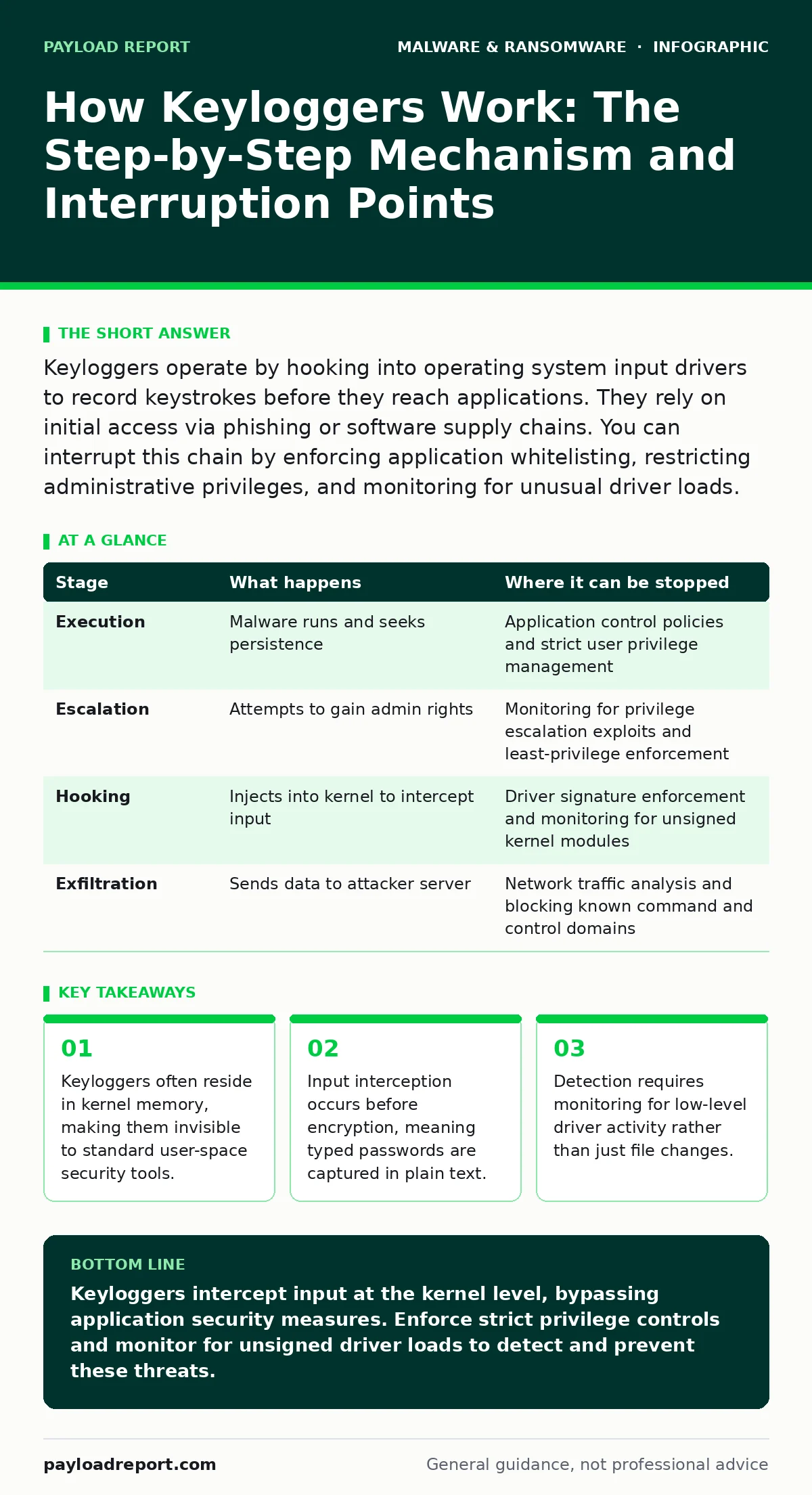
Keyloggers operate by hooking into operating system input drivers to record keystrokes before they reach applications. They rely on initial access via phishing or software supply chains. You can interrupt this chain by enforcing application whitelisting, restricting administrative privileges, and monitoring for unusual driver loads.
Initial Access and Persistence
The lifecycle of a keylogger begins with gaining a foothold on the target system. Attackers rarely write keylogging software from scratch for every victim. Instead, they rely on existing frameworks or exploit vulnerabilities in widely used software. You might encounter this through a malicious document attachment, a compromised software update, or a drive-by download from a defaced website.
Once executed, the malware must survive system reboots. It achieves this by modifying startup configurations. This could involve adding entries to the Windows Registry run keys, creating scheduled tasks, or installing itself as a service. The goal is silent persistence. If the user logs out and back in, the keylogger must restart automatically without triggering obvious visual cues.
Stage 1: Execution and Privilege Escalation
After initial execution, the malware assesses its privileges. A standard user account has limited access to system resources. To install a kernel-level keylogger, the malware needs administrative rights. If the initial payload runs with low privileges, it searches for local privilege escalation vulnerabilities. These are flaws in the operating system that allow a low-privileged process to gain higher privileges.
If escalation fails, the malware may settle for a user-mode keylogger. These are easier to detect and less reliable, as they can often be bypassed by virtual keyboards or clipboard manipulation. However, if escalation succeeds, the malware prepares to inject itself deeper into the system. This step relies on the assumption that users run with unnecessary administrative privileges, a common configuration in many environments.
Stage 2: Kernel Injection and Hooking
This is the technical core of the operation. The malware loads a custom driver into the kernel space of the operating system. The kernel is the central part of the OS that manages hardware and software resources. By operating here, the keylogger gains visibility into all input events, regardless of which application is in focus.
The malware uses a technique called hooking. It intercepts system calls related to keyboard input. When you press a key, the hardware sends a signal to the OS. The keylogger’s hook catches this signal before it reaches the application layer. It records the scan code, which represents the physical key pressed, rather than the character generated. This distinction matters because it captures modifier keys like Shift or Caps Lock, allowing accurate reconstruction of the input even if the character map changes.
Stage 3: Data Recording and Obfuscation
The recorded keystrokes are not immediately sent out. Transmitting data in real-time creates network noise that might alert security tools. Instead, the keylogger buffers the data in memory or writes it to a hidden file on the disk. This file is often encrypted or stored in a system directory that users rarely inspect.
To avoid detection, the malware may obfuscate its presence. It might hide its process name, mask its memory footprint, or use rootkit techniques to prevent other programs from seeing it. Some keyloggers only record activity during specific hours or when certain applications are open, such as web browsers or email clients. This reduces the amount of data exfiltrated and lowers the chance of triggering anomaly detection based on volume.
Stage 4: Exfiltration and Cleanup
Once enough data is collected, the keylogger initiates exfiltration. It sends the recorded keystrokes to a command and control server. This transmission often mimics normal web traffic, such as HTTPS requests, to blend in with legitimate user activity. The attacker then parses the raw keystroke data to extract passwords, credit card numbers, and other sensitive information.
After successful exfiltration, the keylogger may remain dormant for further collection or delete itself to remove traces. However, many modern variants persist to maintain access. They may also install additional payloads, such as crypto-stealing malware or ransomware, leveraging the established foothold. The reliance on standard network protocols makes this stage difficult to distinguish from normal browsing activity without deep packet inspection.
Interruption Points and Detection
Understanding the stages allows you to identify where the chain can be broken. Prevention is always preferable to detection, but detection is necessary when prevention fails. Each stage offers specific opportunities for intervention.
| Stage | What happens | Where it can be stopped |
|---|---|---|
| Execution | Malware runs and seeks persistence | Application control policies and strict user privilege management |
| Escalation | Attempts to gain admin rights | Monitoring for privilege escalation exploits and least-privilege enforcement |
| Hooking | Injects into kernel to intercept input | Driver signature enforcement and monitoring for unsigned kernel modules |
| Exfiltration | Sends data to attacker server | Network traffic analysis and blocking known command and control domains |
You can interrupt the initial execution by enforcing application allowlisting. This ensures that only trusted, signed applications can run. Even if a user clicks a malicious link, the payload cannot execute if it is not on the approved list. This is more effective than traditional antivirus, which often relies on known signatures.
The Hidden Cost of Convenience
A common misconception is that multi-factor authentication stops keyloggers. It does not. If the keylogger records the one-time code as you type it, the attacker can use it immediately. The security benefit of MFA is nullified if the second factor is transmitted over a channel the attacker already controls. This is why hardware-based second factors, which do not involve typing, are superior.
Similarly, endpoint detection and response (EDR) tools can detect suspicious behaviour, but they struggle with kernel-level activity. If the EDR agent itself is compromised or bypassed, the keylogger operates in the blind spot. You must ensure your EDR solution has kernel-level visibility and is configured to alert on unusual driver loads.
Mitigation Strategies
To protect against keyloggers, you must adopt a defence-in-depth approach. No single control is sufficient. Start by restricting administrative privileges. Standard users should not have the ability to install software or modify system settings. This limits the impact of any initial compromise.
Enforce driver signature enforcement. This prevents unsigned or improperly signed drivers from loading into the kernel. Most sophisticated keyloggers require custom drivers, which are difficult to sign legitimately. By blocking unsigned drivers, you raise the barrier for entry significantly.
Monitor for unusual network connections. Keyloggers must send data somewhere. Look for outbound connections to unfamiliar domains or IP addresses, especially those occurring at irregular intervals. Combine this with potentially unwanted programs monitoring to identify legitimate software that may have been abused for malicious purposes.
Regularly update your systems. Many keylogger installations rely on known vulnerabilities in operating systems or applications. Patching removes these entry points. However, updates alone are not enough. You must also monitor for behavioural anomalies. A sudden increase in keyboard activity or unusual process creation can indicate an active keylogger.
Consider using virtual keyboards or clipboard-based password entry for highly sensitive tasks. These methods bypass the physical keyboard input stream, rendering traditional keyloggers ineffective. However, this is a workaround, not a solution. It adds friction for users and does not protect against screen capture or memory scraping.
The Role of System Imaging
Maintaining a clean baseline is critical. Golden images provide a known-good state for your systems. By regularly restoring systems to this image, you can remove any persistent malware that may have evaded detection. This is particularly useful for workstations that handle sensitive data.
However, imaging is not a substitute for real-time protection. It is a recovery mechanism. If a keylogger has already exfiltrated data, restoring the image does not undo the breach. You must still monitor for indicators of compromise and respond to incidents promptly.
See also: Spyware in Small Business: Hidden Risks and Practical Defences · Computer Viruses Explained: How Code Infects and Spreads
Final Considerations
Keyloggers are a persistent threat because they exploit the fundamental way computers interact with users. Every key press is a signal that can be intercepted. The challenge is distinguishing between legitimate input processing and malicious interception.
You must assume that your systems will be targeted. The question is not if, but when. By understanding the stages of keylogger operation, you can build defences that address each step. Focus on privilege restriction, kernel integrity, and network monitoring. These measures raise the cost for attackers and reduce the likelihood of successful data theft.
Key takeaways
- Keyloggers often reside in kernel memory, making them invisible to standard user-space security tools.
- Input interception occurs before encryption, meaning typed passwords are captured in plain text.
- Detection requires monitoring for low-level driver activity rather than just file changes.
Keyloggers intercept input at the kernel level, bypassing application security measures. Enforce strict privilege controls and monitor for unsigned driver loads to detect and prevent these threats.
Frequently asked questions
Can a hardware firewall stop a keylogger?
No, a hardware firewall controls network traffic but cannot prevent malware from executing or recording keystrokes on the local machine.
Do virtual keyboards protect against all keyloggers?
Virtual keyboards protect against traditional keystroke loggers but not against screen capture malware or memory scraping tools.
How do I know if my system has a keylogger?
Look for unusual system performance, unknown drivers in the kernel, or outbound network connections to unfamiliar addresses.
Is multi-factor authentication enough to stop keylogger attacks?
No, if the keylogger records the one-time code, it can be used by the attacker. Use hardware tokens or biometric factors instead.
How this guide was produced: written by the Payload Report editorial team with AI assistance, checked against the public references listed below, and reviewed when the facts change. See our editorial policy or report an error.